
“AI assistant that can control my computer” is one of the fastest-growing searches in this space, and the answers are mostly demos of a cursor moving on its own. That is computer use in the narrow sense: screenshots in, clicks out. It is impressive and it is rarely what the searcher needs.
What they usually need is an agent that can do the task where the task lives: the repo on their disk, the CMS they are logged in to, the folder of receipts, the terminal. This post compares five tools on that, and on the question that comes right after it: how do you stop it doing the wrong thing.
Disclosure: TODO for AI is ours. Same rubric as the rest.
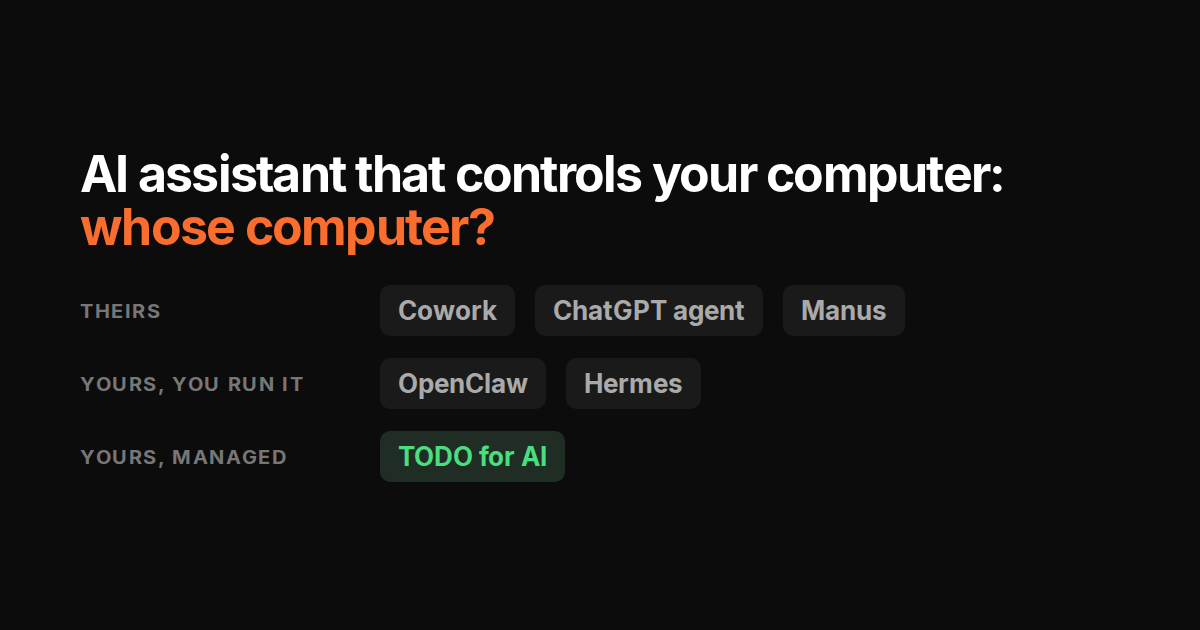
Whose computer?
That is the whole comparison. Three answers exist.
Theirs. By default the agent runs in the vendor’s sandbox with its own browser: public sites and produced files, none of your files or tools. Some add a way into your real browser (Claude in Chrome, Manus Browser Operator, ChatGPT connectors), none give it your shell. Claude Cowork, ChatGPT agent, Manus.
Yours, if you run it. Open-source agents you install on your own machine or VPS. Full access to your shell, files and, once configured, your browser profile. You are the operator: ports, keys, updates, sandboxing. OpenClaw, Hermes Agent.
Yours and theirs, managed. A small runtime on your machine plus a hosted cloud VM, so the agent can reach your disk and your Chrome when it needs to, and keep running on the VM when it does not. TODO for AI.
The five
Claude, with Cowork and computer use
Cowork runs in Anthropic’s isolated environment with a built-in browser. Claude in Chrome (Max and Team, Pro rolling out) drives your real Chrome profile, so logged-in sites are reachable while you are there. Files come in through explicit folder permissions. Permission modes: manual, auto, skip. Nothing runs on your shell. Included from $20. Comparison.
ChatGPT agent mode
OpenAI’s sandbox with its own virtual browser. Accounts come in through connectors or a login you do inside its browser, and sessions can persist between runs. It cannot see your disk. Good for research and public-web tasks; anything on your machine is out of reach. Plus $20. Comparison.
OpenClaw
MIT, self-hosted, talks to you from WhatsApp, Telegram, Slack. Shell, files, inbox, calendar, a local browser tool, any model with your own keys. Exec approvals gate commands. The project’s own security page is candid that exposed instances get found, so keep the gateway off the internet. Free. Comparison.
Hermes Agent
Nous Research’s successor to OpenClaw, and where the self-hosted crowd is moving. Same access model, plus a skills loop that learns from tasks, persistent memory, cron, subagents, and seven sandbox backends from local to Docker to Modal. Attaches to a real Chrome profile over CDP once you configure it. Free; Portal credits around $20 to $200. Comparison.
TODO for AI
Three optional pieces. A bridge, a ~250 KB binary with zero runtime dependencies, gives the agent a shell on your PC over a Noise-encrypted channel. A Chrome extension drives the tabs you attach in your real profile. A cloud VM per account, Firecracker isolated, EU hosted, runs anything that should continue after you close the laptop. Any model on one plan. Per tool: allow, ask first, block; any run stoppable; secrets in a vault. From free. The pillar page has the detail.
Where it is weaker: permissions default to allow, so set ask-first on anything that writes before you trust it with a shell. The extension only sees tabs you attach. Browser items wait for Chrome to be open.
What each can reach
| Your shell | Your files | Your logged-in Chrome | Keeps running, laptop closed | You operate it | |
|---|---|---|---|---|---|
| Claude Cowork | No | Permitted folders | Claude in Chrome, Max and Team | Yes, their cloud | No |
| ChatGPT agent | No | No | Its own browser, connectors | Yes, their cloud | No |
| OpenClaw | Yes | Yes | Local browser, self-configured | Only if your box stays on | Yes |
| Hermes Agent | Yes | Yes | CDP to real profile, self-configured | Only if your box stays on | Yes |
| TODO for AI | Yes, via bridge | Yes | Attached tabs, via extension | Yes, cloud VM | No |
The safety question, honestly
An agent with a shell can delete the wrong directory. An agent in your logged-in browser can send the wrong email. None of the five has solved this; they differ in where the brake is.
- Vendor sandboxes (Cowork, ChatGPT) are safest by construction because they cannot reach your machine. That is also why they cannot do half the tasks.
- Self-hosted agents put the brake in your config: exec approvals, sandbox backend, which chat can talk to it. Strong if you set it, absent if you do not.
- TODO for AI puts the brake per tool and per agent, in the UI: allow, ask first, block, plus a stop button. It is a tool-level gate, not a policy engine. It knows
stripeis a command; it does not know onestripecall refunds and another reads a balance.
Rule that holds for all five: start with ask-first on anything that writes or sends. Widen after you have watched it work. Human-in-the-loop is a setting, not a feature.
How to pick
- Public-web research and documents, nothing of yours involved: ChatGPT agent or Cowork.
- Documents from your folders with the best output quality: Cowork.
- Full control, free, and you like running servers: Hermes.
- Your machine and your browser when the task needs them, a managed VM when it does not, any model, no server to run: TODO for AI.