
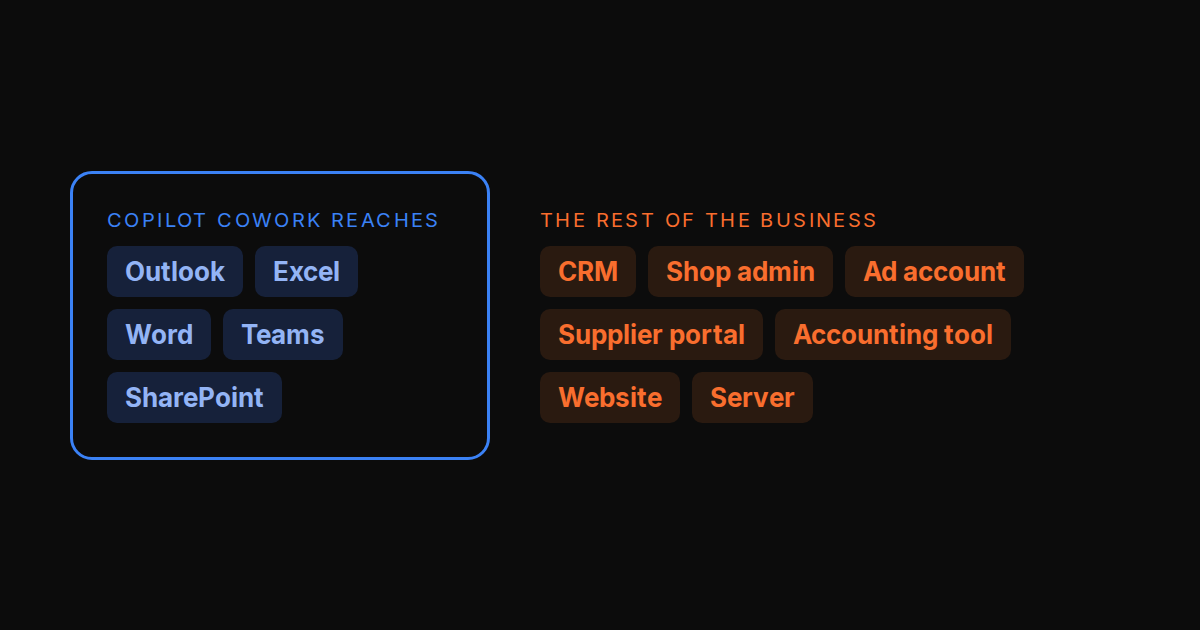
Microsoft made Copilot Cowork generally available on 16 June 2026. You describe a task and it does it across your Microsoft 365: drafts and sends the email, schedules the meeting, builds the Excel model and the deck, posts in Teams, and files the result in SharePoint. It runs in Microsoft’s cloud, so it keeps going when your laptop is closed, and your IT admin gets spending limits and an audit trail.
If your company lives in Microsoft 365, it is the natural agent to add. This post is for the businesses where it doesn’t fit, and for the three reasons we hear most often:
- The work is not all in Microsoft 365. The CRM, the shop admin, the ad account, the supplier portal, the accounting tool and the website are outside it.
- The pricing is two layers. First a Microsoft 365 Copilot license per user, then Copilot Credits for every Cowork task.
- It is one person delegating. Each person hands tasks to their own Cowork. There is no shared list where the team and the AI work the same items.
Disclosure: TODO for AI is ours. We rank it first for the first and third reasons and say where it is weaker.
What Copilot Cowork costs
Two parts, and it helps to be exact because this is where business buyers get surprised.
- A license. Microsoft 365 Copilot Business is $18 per user per month, billed yearly, on a promotion that ends on 31 December 2026. After that it is $21 yearly or $25.20 monthly. It is an add-on to a qualifying Microsoft 365 Business plan, so you pay for that as well. The bundles are $23.50 with Business Standard and $32 with Business Premium, per user per month, yearly.
- Usage. Cowork tasks spend Copilot Credits at $0.01 each, or less if you prepay. What a task costs depends on the model, how much context it pulls in, the tool calls and how long it runs. Microsoft offers a credit estimator because the number is hard to predict up front.
For a five-person team that is about $90 a month in licenses before the first task, plus the Microsoft 365 plan underneath, plus credits.
The short answer
| If you need | Pick |
|---|---|
| The team and AI working one list, across all your tools | TODO for AI |
| The best document and spreadsheet output, and you use Claude | Claude (Cowork) |
| One subscription that covers chat and agent work | ChatGPT Work |
| Your company runs on Google Workspace | Gemini in Google Workspace |
| A fixed process across CRM, email and calendar | Lindy |
1. TODO for AI: best if your work spans more than Microsoft 365
A to-do list for the business where the items get done by AI. The team adds work to one board. Each item is done by an agent in the tools the work actually lives in, and the card shows who asked, which agent ran it and what it produced.
Why it fits the business Copilot Cowork does not:
- It works in your own browser. A Chrome extension drives the tabs you attach in your real, logged-in profile. So the CRM, the shop admin, the ad manager and the supplier portal are all reachable without an API or a connector. Outlook on the web and Excel files are too.
- It works on your own machines. A small bridge gives the agent a shell on your PC or server. A cloud VM keeps running when you close the laptop.
- One board for the team. People and agents hold the same items. You can see what the AI did in the company’s name before it goes further. How the board works.
- One price, one pool. Team seats are $30 standard and $120 premium, minimum two, and the money goes into one shared usage pool plus $50 on top. Every model is included: Claude, GPT, Gemini and Grok, chosen per agent. There is no license layer under it.
Where it is weaker: it has no tenant-level admin controls of the kind IT departments expect from Microsoft, and it is a small company. Setup is not zero: you install the extension, and the bridge if you want it on a machine. Browser tasks need Chrome running. Permissions are per tool (allow, ask first, block), not per action. If your work really is all in Outlook, Teams and Office, Copilot Cowork will be quicker to roll out.
Free to start with $2 of usage. Full comparison with Copilot Cowork.
2. Claude, with Cowork built in: best output quality
The product Copilot Cowork was named after. Since 16 September 2026 Cowork is part of Claude itself. Hand it a folder and an outcome and it returns spreadsheets with working formulas, decks and reports. Scheduled tasks run in Anthropic’s cloud, and Claude in Chrome works in your logged-in browser on every paid plan. Copilot Cowork runs mostly on Anthropic’s models too, so the output is similar. The difference is the perimeter: Claude isn’t limited to Microsoft 365, and it isn’t wired into it either.
Pro is $20, Team is $25 or $125 per seat. Anthropic models only, one person’s sessions, in Anthropic’s sandbox. Our Claude Cowork alternatives post covers it in depth.
3. ChatGPT Work: best if the team already pays for ChatGPT
OpenAI’s agent, launched on 9 July 2026. It creates finished sheets, slides, docs and web apps, runs scheduled and triggered tasks, and connects to SharePoint, Teams, Outlook, Slack, Google Drive and CRMs through plugins. In the desktop app it can use local files and apps. It is included with ChatGPT plans (Business is $25 per seat) and draws more of your allowance for bigger tasks, so there is no second meter to buy. OpenAI models only. Its cloud browser keeps its own sessions, so you sign in there.
4. Gemini in Google Workspace: best if you are on Google, not Microsoft
The same idea on the other side. Gemini is in Gmail, Docs, Sheets, Slides, Meet and Drive, and Workspace Studio builds agents in plain English. All of it is included from Business Standard (€13.60 per user, yearly) with no separate AI license. Like Copilot Cowork, its reach ends where Google’s apps end.
5. Lindy: best for a fixed process across your business apps
If the thing you want automated has a known shape (new lead, enrich, add to CRM, email, book the meeting), Lindy builds it without code and runs it every time, across far more apps than Microsoft 365. From $30 for 3,000 credits. It is weaker on open-ended, one-off tasks. Comparison.
Side by side
| Works outside Microsoft 365 | Team shares the work | Models | What you pay | From | |
|---|---|---|---|---|---|
| Copilot Cowork | Partner plugins, Edge preview | Per user | Microsoft picks | License + credits | $18 + credits |
| TODO for AI | Your browser, your machines, any CLI | One board | Every vendor | One plan or seats, one pool | Free, $20 |
| Claude (Cowork) | Connectors, Claude in Chrome | Projects shared on Team | Anthropic only | Plan with usage windows | $20 |
| ChatGPT Work | Plugins, cloud browser | Shared scheduled tasks | OpenAI only | Plan allowance | $20 |
| Gemini in Workspace | Inside Google apps | Workspace sharing | Google only | Workspace seat | €13.60 |
| Lindy | Integration catalogue | Shared workflows | You pick | Credits | $30 |
How to choose
Draw a line around Microsoft 365. List the ten things your team did last week that you would hand to an AI. If eight of them happen in Outlook, Excel and Teams, buy Copilot Cowork and stop reading. If half of them happen in a CRM, a shop, an ad account or on a server, you need an agent that works where those are.
Count the people who will hand it work. One person: any of these works. A team: you want a place where everyone sees what the AI was asked to do and did, before it does more in the company’s name. That is what the /alternatives table calls a shared board, and it is the column most agents leave empty.
Prices were checked on 2026-09-24. The Copilot Business promotion ends on 31 December 2026.