
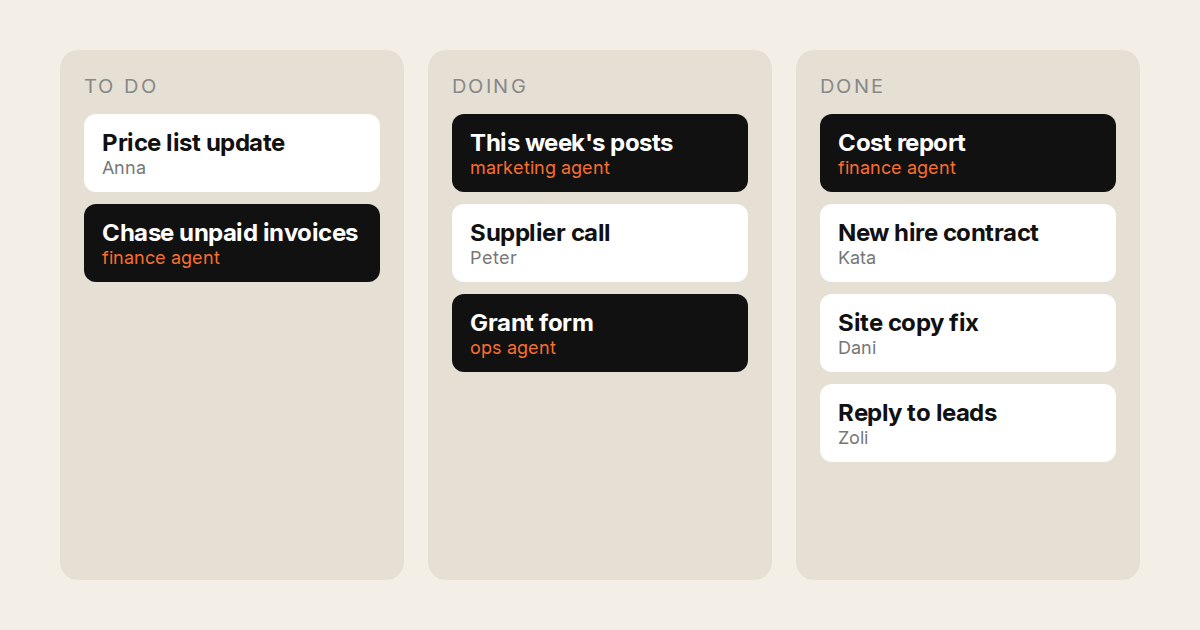
Buy an AI agent for a team of five and you usually end up with five AI agents. Each person gets a seat, their own chats and their own usage limit. Nobody can see what the others asked for. One person hits their cap on Tuesday while two others use a tenth of theirs.
That is fine for thinking tools. It is a problem for an agent that acts in the company’s name. Once the AI sends emails, files forms and edits the shared spreadsheet, the team needs to see what it did, and the owner needs one bill.
This post ranks agents on four things a small team needs:
- A shared list. People and the AI work on the same items, and everyone can see who (or which agent) did what.
- One price. A single plan for the team, not a stack of licenses and add-ons.
- A shared budget. Usage is pooled, so the busy person is not capped while the others’ allowance goes unused.
- It does the work. It acts in the team’s real tools and doesn’t just draft.
Disclosure: TODO for AI is ours. On our own comparison table it is the only row with all six columns filled. Its limits are below.
The short answer
Prices are per person per month on monthly billing, so every row is on the same basis.
| Shared list | One price | Pooled budget | Does the work in your tools | Team price | |
|---|---|---|---|---|---|
| TODO for AI | Yes, one board | Yes, seats, every model | Yes, plus $50 | Your browser, your machines | $30 / $120 per seat |
| ChatGPT Business | Shared projects, private chats | Yes | No, per person | ChatGPT Work, own cloud browser | $25 per seat |
| Claude Team | Shared projects, tasks per person | Yes | No, per-seat windows | Cowork, Claude in Chrome | $25 / $125 per seat |
| ClickUp | Yes, agents assignable | Seat + AI seat + credits | Credits pooled | Workspace and connected tools | $19 + $18 to $68 |
| Notion | Yes, agents shareable | Seat + credits | Credits pooled | Workspace and MCP apps | $24 + credits |
| Lindy | Shared workflows | Credits | Yes, pooled | Integrations, computer use | From $30 |
1. TODO for AI: best for a team that wants the work done
A shared to-do list for the business, where each item can be done by a person or an agent.
- One board. Everyone adds work to the same list. The card shows who asked, which agent ran it and what came back, and you can filter the board by person. Anyone can pick up an item the AI started, or hand one to the AI.
- Many agents, each set up for its job. The finance agent and the marketing agent each have their own model, instructions, tools and permissions (allow, ask first or block). How that works.
- The seat price is the AI budget. Standard seats are $30 and premium seats $120, with a minimum of two. Every dollar of the seat goes into one shared usage pool, and we add $50 on top. On the work tools below, the seat buys the workspace and AI is a second line: an AI seat, credits or a request meter. Here there is no second line. Every model is included, so a cheap one can do triage and a strong one the hard part, from the same pool, and the cloud VM and cloud browser come with it.
- It works in your tools. The team’s real logged-in Chrome via an extension, your PCs and servers via a small bridge, and a cloud VM for work that should continue with laptops closed.
- It proposes work. It reads your website and suggests tasks worth doing. That feature is early, so treat it as a bonus, not the reason to buy.
Evidence: the accounts that keep paying us are teams. Individuals on the $20 plan are the ones who leave. It is a small sample, but it is why this page exists.
Where it is weaker: the pool is shared, but per-seat session and weekly windows still pace how fast one person can draw it down (premium seats get 5x). Setup is per person (extension, and the bridge if they want their machine connected). Browser tasks need Chrome running. Permissions are per tool, not per action. The mobile app is still in progress. And we are a small company, which matters if you need a vendor security review.
There is also a free team tier with 5 seats and a small pool, enough to set up the workspace before paying.
2. ChatGPT Business: best if the team mainly wants a better assistant
$25 per seat. Everyone gets ChatGPT, shared projects and ChatGPT Work for longer tasks that return finished sheets, docs and slides. The agent uses OpenAI models only. Its cloud browser signs in separately from your Chrome, and usage is per person. It is the easiest to roll out because everyone already knows it. It does less as a place where the team’s work is tracked.
3. Claude Team: best output quality
$25 standard and $125 premium per seat, minimum two. Cowork is now part of Claude, and Claude in Chrome works on all paid plans. Team plans can share a project with view or edit access. Each person’s tasks are their own sessions, and each seat has its own usage windows. Anthropic models only. Our Claude Cowork alternatives post has the detail.
4. ClickUp: best if the team already runs on ClickUp
ClickUp’s Super Agents can be assigned tasks and @mentioned like teammates, and you can pick Claude, GPT or Gemini. It is the closest to a shared list on this page. The agent works on workspace objects and connected tools, with no shell and no logged-in browser. The price stacks: a $19 Business seat, plus an $18 or $68 AI seat, plus credits ($12, $9 and $28 on yearly billing). Comparison.
5. Notion: best if the team’s knowledge lives in Notion
Custom Agents run on schedules and triggers, choose their model, and can be shared like teammates. Their reach is Notion plus whatever MCP connections an admin enabled. There is no shell and no logged-in browser. $24 per member on Business ($20 yearly), plus $10 per 1,000 credits for agent work. Comparison.
6. Lindy: best for the team’s repeatable processes
Build a workflow once (inbox triage, CRM updates, meeting prep) and it runs for the whole workspace, with credits pooled. It is strongest where the process is fixed and weakest on the one-off request. From $30 for 3,000 credits. Comparison.
What a five-person team pays
A rough monthly bill for five people who all want agent work, at list prices on monthly billing.
- TODO for AI: 4 standard + 1 premium = $240, a $290 shared pool, every model.
- ChatGPT Business: 5 × $25 = $125, per-person limits, OpenAI models.
- Claude Team: 4 standard + 1 premium = $225, per-seat windows, Anthropic models.
- ClickUp: 5 × ($19 + $68 Everything AI) = $435, plus Super Credits above the included amount. On yearly billing, 5 × ($12 + $28) = $200.
- Notion: 5 × $24 = $120 for the workspace, and agent work is $10 per 1,000 credits on top.
- Asana Advanced: 5 × $30.49 ≈ $152, with 25 AI requests in total (capped at 50 per account), then $0.50 to $0.60 per request.
- Copilot Cowork: 5 × $18 = $90 in licenses (a yearly, promotional price), plus the Microsoft 365 plan, plus Copilot Credits per task. Details.
Read the lines by what the money buys. Ours is the only one where the bill is the AI budget: all $240 goes into a $290 shared pool, spent on any model. The ChatGPT and Claude lines buy an assistant with per-person limits. The ClickUp, Notion and Asana lines buy the workspace, and the agent work is metered on top. Beyond price, what matters is whether the work gets done and whether the team can see it.
How to choose
Is the team trying to think better or to get more done? For thinking, writing and research, ChatGPT Business or Claude Team is the right buy. For handing off work that ends up in the CRM, the spreadsheet or the customer’s inbox, choose a tool where the team can see what the AI did.
Where does the team’s work already live? If it’s in ClickUp or Notion, their agents are the least disruption. If it’s spread across ten tools and a few browser tabs, you need an agent that works in those tools.
Try it with the team: todofor.ai has a free team tier with 5 seats. Compare every option on one table.